Good collection of articles on SQL Server Restore, etc.
http://solutioncenter.apexsql.com/reverting-your-sql-server-database-back-to-a-specific-point-in-time/
Wednesday, September 16, 2015


Saturday, September 12, 2015
SharePoint 2013 + Windows Server 2012 R2 Pre-Requisite Install (Part 2)

There are 10 files to download and install with some care to pass this check successfully. In fact, it is a little bit tricky to perform this pre-requisite installation successfully the first time.
- On the SharePoint server, create a folder, "C:\pre".
-
Download the 10 files below and save them to "C:\pre" folder.
- Windows Management Framework 3.0
http://www.microsoft.com/en-us/download/details.aspx?id=34595 - SQL Server 2008 R2 SP1 Native Client
http://download.microsoft.com/download/9/1/3/9138773A-505D-43E2-AC08-9A77E1E0490B/1033/x64/sqlncli.msi - Microsoft WCF Data Serivces 5.0
http://download.microsoft.com/download/8/F/9/8F93DBBD-896B-4760-AC81-646F61363A6D/WcfDataServices.exe - Microsoft WCF Data Services 5.6 (To avoid overwrite, rename this download to WcfDataServices56.exe)
http://download.microsoft.com/download/1/C/A/1CAA41C7-88B9-42D6-9E11-3C655656DAB1/WcfDataServices.exe - Microsoft Information Protection and Control Client
http://download.microsoft.com/download/9/1/D/91DA8796-BE1D-46AF-8489-663AB7811517/setup_msipc_x64.msi - Microsoft Sync Framework Runtime version 1.0 SP1 (64-bit)
http://download.microsoft.com/download/E/0/0/E0060D8F-2354-4871-9596-DC78538799CC/Synchronization.msi - Windows Identity Extensions
http://download.microsoft.com/download/0/1/D/01D06854-CA0C-46F1-ADBA-EBF86010DCC6/r2/MicrosoftIdentityExtensions-64.msi Windows Identity Foundation (KB974405)
http://download.microsoft.com/download/D/7/2/D72FD747-69B6-40B7-875B-C2B40A6B2BDD/Windows6.1-KB974405-x64.msu
Windows Identity Foundation has been integrated into .NET 4.5. No need to install it.- Windows Server AppFabric
http://download.microsoft.com/download/A/6/7/A678AB47-496B-4907-B3D4-0A2D280A13C0/WindowsServerAppFabricSetup_x64.exe - Windows Server AppFabric Cumulative Update 1 (KB2671763)
http://download.microsoft.com/download/7/B/5/7B51D8D1-20FD-4BF0-87C7-4714F5A1C313/AppFabric1.1-RTM-KB2671763-x64-ENU.exe
- Windows Management Framework 3.0
-
We are supposed to install prerequisite files via "PrerequisiteInstaller.exe" with specific switches for each downloaded file. In my case, this didn't work too well. You can try the following Powershell scripts, but if you have problems, there is a manual way to install the prerequisite files. I'll go over it in #4.
PowerShell Script to run prerequisite install altogether:.$path = "C:\pre" Start-Process "E:\PrerequisiteInstaller.exe" –ArgumentList "/SQLNCli:$Path\sqlncli.msi /IDFX:$Path\Windows6.1-KB974405-x64.msu /IDFX11:$Path\MicrosoftIdentityExtensions-64.msi /Sync:$Path\Synchronization.msi /AppFabric:$Path\ WindowsServerAppFabricSetup_x64.exe /KB2671763:$Path\AppFabric1.1-RTM-KB2671763-x64-ENU.exe /MSIPCClient:$Path\setup_msipc_x64.msi /WCFDataServices:$Path\WcfDataServices.exe /WCFDataServices56:$Path\WcfDataServices56.exe"

Prerequisite Files (Beware of the last one: AppFabric) - It turns out that all prerequisite files can be installed manually via "Shift + Right Click" and "Run as Administrator", except for the two AppFabric install files.
"WindowsServerAppFabricSetup_x64.exe"
"AppFabric1.1-RTM-KB2671763-x64-ENU.exe"
To install AppFabric, make sure to uninstall AppFabric from "Add Remove Programs" window from previous failed attempt if any. Reboot the server if uninstall was performed and run the following in Command Prompt (in admin mode).
C:\Pre\WindowsServerAppFabricSetup_x64.exe /i CacheClient,CachingService,CacheAdmin /gac
(Basically, the above switches are what the "PrerequisiteInstaller.exe" tried to implement when the setup file was run under PrerequisiteInstaller.exe) - Let it run for a couple of minutes. Check with TaskManager and "Add/Remove Programs" to confirm AppFabric 1.1's installation. Then reboot the server, and then run "AppFabric1.1-RTM-KB2671763-x64-ENU.exe" with "Run as Admin". This should be the end of SharePoint 2013's prerequisite installation, and you should be able to proceed with the SharePoint 2013 setup.

SharepPoint 2013 + Windows Server 2012 R2 Pre-requisite Install (Part 1)
This will save some time when building a SharePoint 2013 dev envionrment or when setting up SharePoint server in general.
Note: The third command is a single line. Remove any line-feed / carriage-return before running the script in PowerShell.
Import-Module ServerManager

Add-WindowsFeature NET-WCF-HTTP-Activation45, NET-WCF-TCP-Activation45, NET-WCF-Pipe-Activation45

Add-WindowsFeature Net-Framework-Features,Web-Server,Web-WebServer,Web-Common-Http,Web-Static-Content,Web-Default-Doc,Web-Dir-Browsing,Web-Http-Errors,Web-App-Dev,Web-Asp-Net,Web-Net-Ext,Web-ISAPI-Ext,WEB-ISAPI-Filter,Web-Health,Web-Http-Logging,Web-Log-Libraries,Web-Request-Monitor,Web-Http-Tracing,Web-Security,Web-Basic-Auth,Web-Windows-Auth,Web-Filtering,Web-Digest-Auth,Web-Performance,Web-Stat-Compression,Web-Dyn-Compression,Web-Mgmt-Tools,Web-Mgmt-Console,Web-Mgmt-Compat,Web-Metabase,Application-Server,AS-Web-Support,AS-TCP-Port-Sharing,AS-WAS-Support,AS-HTTP-Activation,AS-TCP-Activation,AS-Named-Pipes,AS-Net-Framework,WAS,WAS-Process-Model,WAS-NET-Environment,WAS-Config-APIs,Web-Lgcy-Scripting,Windows-Identity-Foundation,Server-Media-Foundation,Xps-Viewer
Note: The third command is a single line. Remove any line-feed / carriage-return before running the script in PowerShell.
Sunday, September 6, 2015
.NET optimization service at very high CPU utilization
On Server 2012 R2, after running Windows Update to install important updates, the CPU utilization of the server could get pegged at 100% due to .NET optimization service (Ngen.exe).
As the name suggests, all installed .NET frameworks are being optimized via re-compiling, which leads to a prolonged period of 100% CPU usage.
Run the following if you want to get this optimization process over with at your command. Run it and come back after a while (10~20 min). When it is done, the server should behave normally.
After optimization is done for each .NET Framework version, when running the command again, you will see confirmation message like below.

As the name suggests, all installed .NET frameworks are being optimized via re-compiling, which leads to a prolonged period of 100% CPU usage.
Run the following if you want to get this optimization process over with at your command. Run it and come back after a while (10~20 min). When it is done, the server should behave normally.
Get-ChildItem $env:SystemRoot\Microsoft.net\NGen.exe -recurse | ForEach-Object { & $_ executeQueuedItems }
Basically, the command above lets us to run "Ngen.exe executeQueuedItems" per each .NET Framework versions manually at the time of our choosing, rather than letting the server finish when it can later, which may cause unexpected slowness in performance.After optimization is done for each .NET Framework version, when running the command again, you will see confirmation message like below.

Thursday, September 3, 2015
C# quick extension method refresher - Left() and Right() methods
Here's a quick refresher of C#'s extension methods. If you are not familiar with or forgot about extension methods, check out this post at dotnetperls.
using System;

public class Program
{
 public static void Main()
 {
  Console.WriteLine("Hello World");

  string a = "Hello Orange County";
  Console.WriteLine("a.Right(6) = " + a.Right(6));
  Console.WriteLine("a.Left(7) = " + a.Left(12));
 }
}

public static class ExtensionMethods
{
 public static string Right(this string original, int numChar)
 {
  string retVal = "";
  if(original != null && numChar >= 0)
  {
   return original.Substring(numChar > original.Length ? 0 : original.Length - numChar);
  }
  return retVal;
 }

 public static string Left(this string original, int numChar)
 {
  string retVal = "";
  if(original != null && numChar >= 0)
  {
   return original.Substring(0, (numChar > original.Length ? original.Length : numChar));
  }
  return retVal;
 }
}
By the way, there is an amazing online C# compiler tool called ".NET Fiddle". It lets you quickly build and test your C# prototype program online, including ASP.NET MVC-based prototypes. Just like the JSFiddle, you can create your own account and start building your own personal code libraries.
Here's a review article about .NET Fiddle.
Here's a review article about .NET Fiddle.
 |
| .Net Fiddle Screenshot |
Monday, December 22, 2014
Chrome's console.table
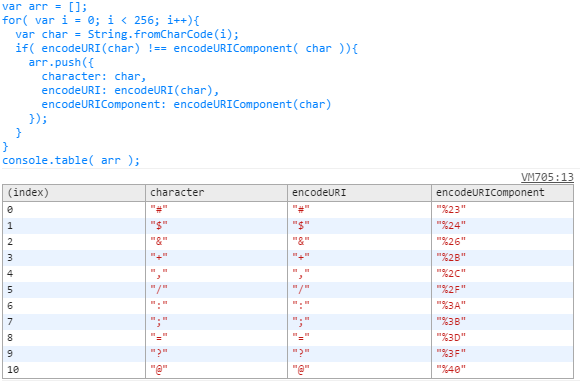
Google Chrome's console.table( ) is a great feature. The following example code (source) shows how powerful and useful this feature of Chrome can be.
** Note: to enter line break in the Chrome's console, use [Shift] + [Enter] keys.
var arr = [];
for( var i = 0; i < 256; i++ ){
  var char = String.fromCharCode( i );
  if( encodeURI( char ) !== encodeURIComponent( char )){
    arr.push({
      character: char,
      encodeURI: encodeURI( char ),
      encodeURIComponent: encodeURIComponent( char )
    });
  }
}
console.table( arr );
It produces the following table within the console of Chrome.** Note: to enter line break in the Chrome's console, use [Shift] + [Enter] keys.
Sunday, November 23, 2014
Smooth Scroll in Visual Studio on VM Windows in Parallels Desktop
When using Visual Studio in Windows running on Parallels Desktop on Mac, I used to have a jumpy scroll issue on the Source Code or the Solution Explorer window. Whether I used the built-in MacBook Pro's TrackPad or an external mouse's scroll wheel, I was not able to fine-control the number of lines to scroll up or down while using the Visual Studio. The only way to scroll a few lines at a time was by using the scroll bar on the right, but this can be very counter-intruitive, since we are so used to the scrolling via the scroll wheel.
The easy workaround to this nuisance is rather simple. Go into the VM settings in the Parallels Desktop VM, select Hardware --> Mouse & Keyboard, and then un-check "Enable smooth scrolling".
The easy workaround to this nuisance is rather simple. Go into the VM settings in the Parallels Desktop VM, select Hardware --> Mouse & Keyboard, and then un-check "Enable smooth scrolling".
 |
| Un-check "Enable smooth scrolling" to Enable smooth scrolling. |
Subscribe to:
Posts (Atom)