Thursday, June 8, 2017


Tuesday, May 16, 2017
Maximum request length exceeded
ASP.NET by default has a limit of 4 MB of file upload. In order to bump up this limit, web.config needs to be updated. Below is example to allow 1 GB of file upload (1 GB = 1048576 KB = 1073741824 Bytes).
<configuration>
 <system.web>
  <httpRuntime maxRequestLength="1048576" />
 </system.web>
</configuration>
For IIS 7 or later, the following is also needed. Max size value in KB and Bytes must match in both places.
<system.webServer>
 <security>
  <requestFiltering>
   <requestLimits maxAllowedContentLength="1073741824" />
  </requestFiltering>
 </security>
</system.webServer>
In order to specify execution timeout, add executionTimeout value in seconds as follows.
<configuration>
 <system.web>
  <httpRuntime maxRequestLength="1048576" executionTimeout="3600" />
 </system.web>
</configuration>
Thursday, May 4, 2017
Remove time info from getdate()
In SQL Server, a quick efficient way to remove time info from getdate() is
Select [Today] = DateAdd(dd, DateDiff(dd, 0, getdate()), 0)The result would be something like '2017-05-04 00:00:00.000', which is handy when comparing against date-only column values.
Wednesday, May 3, 2017
SQL Server Transaction - Basic Syntax Example
A quick refresher on proper SQL Server transaction syntax example:
BEGIN TRANSACTION;
BEGIN TRY

    UPDATE dbo.Users set Acitve = 1 Where UserID = 23398

END TRY
BEGIN CATCH

    SELECT
        ERROR_NUMBER() AS ErrorNumber
       ,ERROR_SEVERITY() AS ErrorSeverity
       ,ERROR_STATE() AS ErrorState
       ,ERROR_PROCEDURE() AS ErrorProcedure
       ,ERROR_LINE() AS ErrorLine
       ,ERROR_MESSAGE() AS ErrorMessage;

    IF @@TRANCOUNT > 0
        ROLLBACK TRANSACTION

END CATCH

IF @@TRANCOUNT > 0
    COMMIT TRANSACTION
Friday, April 14, 2017
Set Site Collection to ReadOnly
Two ways to set a site collection to readonly:
LockState options:
- Central Admin --> Application Management --> Site Collections --> Configure Quotas and Locks --> Select Site Collection --> Select ReadOnly
- Via PowerShell:
Set-SPSite -Identity "site_collection_url" -LockState "ReadOnly"
LockState options:
- Unlock to unlock the site collection and make it available to users.
- NoAdditions to prevent users from adding new content to the site collection. Updates and deletions are still allowed.
- ReadOnly to prevent users from adding, updating, or deleting content.
- NoAccess to prevent users from accessing the site collection and its content. Users who attempt to access the site receive an error.
Thursday, April 13, 2017
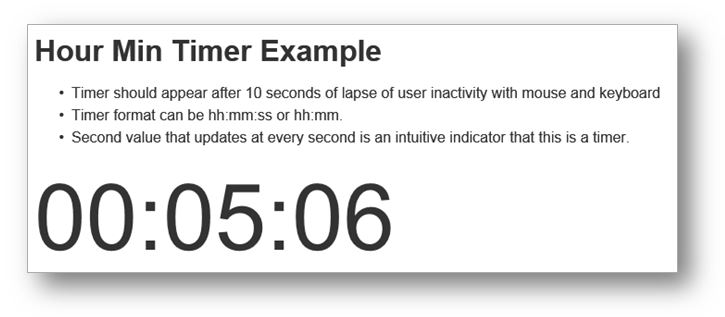
Quick Javascript Timer
Example of a quick hh:mm:ss timer
<!doctype html>
<html>
<head><title>Timer After 10 seconds</title>
<style>
body{font-family: Arial; line-height: 1.5em; color: #333;}
.timer{font-size: 100px; line-height: 120px;}
</style>
<script type="text/javascript" src="http://ajax.aspnetcdn.com/ajax/jQuery/jquery-1.10.0.min.js"></script>
</head>
<body>
<h1>Hour Min Timer Example</h1>
<p>
<ul>
 <li>Timer should appear after 10 seconds of lapse of user inactivity with mouse and keyboard</li>
 <li>Timer format can be hh:mm:ss or hh:mm.
 <li>Second value that is updated at every second is an intuitive indicator that this is a timer.
</ul>
</p>
<div class="timer">
 <span class="timeOutput" id="timeOutput"></span>
</div>
<script>

// Reset and tick every second
var my = my || {};

my.friendlyTime = function( sec ){

 this.ss = "0" + (sec % 60);
 this.ss = this.ss.substring( this.ss.length-2, this.ss.length );
 this.mm = "0" + Math.floor( sec / 60 ) % 60;
 this.mm = this.mm.substring( this.mm.length-2, this.mm.length );
 this.hh = "0" + Math.floor( sec / 3600 );
 this.hh = this.hh.substring( this.hh.length-2, this.hh.length );
};

my.display_time_since_pageload = function( initial_delay_sec, display_format, display_selector){
 /*
  initial_delay_sec: seconds to wait to display the ellapsed time
  display_format: "hh:mm:ss" or "hh:mm"
  display_selector: location to display the elapsed time. must be jQuery-format selector
 */
 var totalSec = 0;

 setInterval(function(){

  totalSec++;
  //console.log( "totalSec = " + totalSec );

  if( totalSec >= initial_delay_sec ){

   var t = new my.friendlyTime( totalSec );

   if(display_format == "hh:mm:ss") {
    $(display_selector).html( t.hh + ":" + t.mm + ":" + t.ss );
   }
   if(display_format == "hh:mm") {
    $(display_selector).html( t.hh + ":" + t.mm );
   }
   //console.log( "t.hh = " + t.hh + ", t.mm = " + t.mm + ", t.ss = " + t.ss );
  }

 }, 1000);
};

$(function(){
 my.display_time_since_pageload( 10, "hh:mm:ss", "#timeOutput" );
});

</script>


</body>
</html>
Wednesday, March 29, 2017
Set [Enter] key as default action to cause associated button to click
In the example below, each textbox has its own default button. While focus is in a text box, pressing [Enter] key will cause the associated button to click so that you do not need to click the associated button separately.


<!doctype html>
<html>
<head><title>Set Enter Key as default Click</title>
<style type="text/css">
 body { font-family: Verdana, Tahoma; line-height: 1.7em; font-size: 0.85em; }
</style>
<script
  src="https://code.jquery.com/jquery-1.12.4.min.js"
  integrity="sha256-ZosEbRLbNQzLpnKIkEdrPv7lOy9C27hHQ+Xp8a4MxAQ="
  crossorigin="anonymous"></script>
</head>
<body>
 <h1>Enter Key Capture</h1>
 <div>
  <input type="text" id="txt1" />
  <input type="button" id="btn1" class="defaultButton" value="Button1" />
 </div>
 <div>
  <input type="text" id="txt2" />
  <input type="button" id="btn2" class="defaultButton" value="Button2" />
 </div>
</body>
<script type="text/javascript">
 $( document ).ready( function() {

  $( 'input[type=text]' ).bind({
   keypress: function( event ){
    if( checkIfEnterKeyPressed() ){

     var message = "Enter key has been pressed while in " +
         $(this).attr("id") + ".";

     $(this).siblings(".defaultButton").bind(
      "click",
      { msg: message },
      function( event ){
       alert( event.data.msg + "\n" + $(this).val() + " clicked." );
      }
     ).click();
    }
   }
  });

  var checkIfEnterKeyPressed = function(){
   var keycode = ( event.keyCode ? event.keyCode : event.which );
   return ( keycode == '13' ? true : false );
  };
 });

</script>
</html>
Subscribe to:
Posts (Atom)